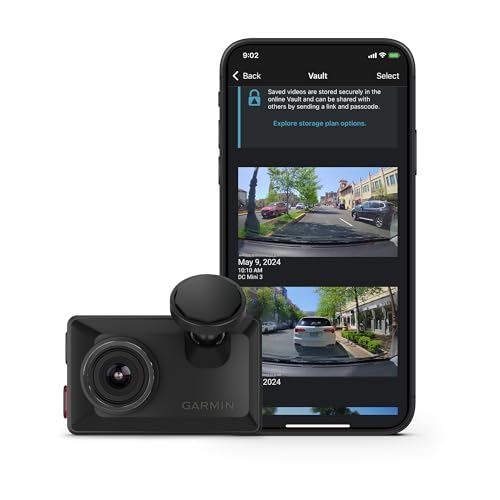
The Garmin Dash Cam X310 is the plug-and-play pick among the models we compared. It is a single front camera that records 4K, has a touchscreen so you can check the shot, listens for “OK, Garmin” voice commands and pairs with the Garmin Drive app. In our dash cam ranking for 2026, it is the model for drivers who want a clean, easy setup from a well-known brand rather than a full multi-camera system.
Everything below comes from Garmin’s official owner’s manual for the Dash Cam X310 (September 2024), and we credit Garmin for each detail. Garmin’s product pages did not open for us, so we leave out figures the manual does not state, such as the lens angle. Check the Amazon listing for those.
The Short Version
According to Garmin, the X310 records 4K video with HDR to a microSD card, saves a clip automatically when it senses an incident, and enters a Parking Guard mode when you turn off the car. It has a touchscreen, voice control, a status LED and a built-in battery that Garmin lists for parked recording without external power. Driver awareness features include forward collision warning, lane departure warning and a go alert.
The extras that go beyond a basic dash cam, such as Vault cloud storage and live view, require a paid subscription.
Key Specs According to Garmin
- Video modes: 4K at 30 fps with HDR (3840 x 2160), 1080p at 120 fps, and 1080p at 30 fps with HDR.
- Codec and files: HEVC (H.265) in MP4 files.
- Controls: touchscreen, a power button and voice control with the default wake word “OK, Garmin.”
- Memory card: microSDHC or microSDXC, 8 GB to 512 GB, Class 10 or faster, exFAT.
- Operating temperature: -4°F to 140°F (-20°C to 60°C). Garmin lists a charging range of 32°F to 140°F.
- Input power: 4.75 to 5.25V DC at 1 A, through the included vehicle power adapter.
- Wireless: Bluetooth for pairing and Wi-Fi bands of 2.4, 5.1 and 5.7 GHz.
- Mount: adhesive windshield mount.
- Camera network: supports multiple Garmin dash cams in one vehicle through the Garmin Drive app.
Video, HDR and Incident Detection
The headline is 4K at 30 fps with HDR, which suits daytime commuting and gives you room to read details in a clip. Garmin says HDR combines multiple exposure levels in each frame and can improve clarity in high-contrast or low-light conditions. The 1080p 120 fps setting is there if you want slow-motion-style footage, and the 1080p HDR setting saves card space.
By default, the camera records continuously and deletes the oldest unsaved footage when the card fills. When it detects a possible incident, it saves 15 seconds before and 15 seconds after the event and stamps the clip with time, date and location. You can also press a button or say “Save Video” to keep a clip, or go back through temporary footage in the gallery and save a 30-second clip from it.
There is a privacy option too. If you select Promptly Delete, the camera continually deletes unsaved video more than three minutes old and deletes all unsaved video each time it powers off. The trade-off is that you cannot record Travelapse videos or view unsaved video while that option is on.
Driver Alerts
Garmin includes several driver awareness features. The manual describes:
- Forward collision warning: alerts you when the following distance looks unsafe. It works above 40 mph and may not detect vehicles farther than 130 feet or closer than 16 feet.
- Lane departure warning: alerts you when you may be crossing a lane boundary unintentionally, also only above 40 mph.
- Go alert: a tone and on-screen alert when stopped traffic ahead starts moving again.
- Red light and speed cameras: available in some areas and for some models with a paid subscription, according to Garmin.
Garmin is clear that these features are for information only and do not replace your attention. It also says rain, fog, snow, glare or darkness can limit them, and that they work best when you set the camera placement (left, center or right of the windshield, and normal or tall vehicle height) correctly in the menu.
Parking Guard and Power Options
The X310’s included power cable runs to the vehicle power adapter, which plugs into a 12V outlet. Garmin advises using the included adapter rather than a vehicle USB port, because a USB port may not supply enough power for reliable operation. It also says the cable is designed to be routed out of sight along the trim, so a basic install can be quick.
For parked recording, the camera enters Parking Guard automatically when you turn off the vehicle while it is connected to external power. If your outlet shuts off with the ignition, Garmin offers a Run on Battery setting that uses the camera’s own battery, though the manual notes it can turn on unexpectedly if you touch the camera. Garmin lists a Parking Mode Cable and a Constant Power Cable, which connects to the OBD II port, as separate accessories. The Constant Power Cable has a time switch with 10-minute, 24-hour and always-on settings, plus low-battery protection at 12V. Garmin recommends an experienced installer for the Parking Mode Cable.
Parking Guard saves videos to a separate folder and can send phone notifications, which requires a Vault subscription and Wi-Fi.
Vault, the App and Voice Control
The Garmin Drive app handles pairing, viewing videos, editing, exporting and changing settings. With a paid Vault subscription and a Wi-Fi connection, the camera uploads saved videos automatically and lets you view a live feed remotely. Garmin does not list specific plan terms in the manual, so check the Garmin Drive app for current options before counting on them.
Voice control understands commands for saving a video, switching audio on and off and starting a Travelapse, which is a fast-motion video of your trip. Garmin notes voice control is not available in every language, though you can speak English commands with another interface language.
Heat and Storage
Garmin says its cameras are designed for the automotive environment and that it is normal for them to run warm or hot in full sun. The manual’s operating range for the X310 is -4°F to 140°F. The manual refers to charging the camera and running on its battery, which indicates a built-in battery rather than a supercapacitor, and it does not name the battery type. If you park in extreme heat for hours every day, a model with a listed supercapacitor, such as the Thinkware U3000 PRO or the VIOFO A329S, may hold up better.
Garmin asks you to format the memory card at least once every six months and warns that all microSD cards wear out after many overwrites. The camera alerts you when a card needs formatting or replacing. Garmin recommends a high-quality Class 10 or faster card.
Installation and Legal Notes
The adhesive mount is hard to remove, so pick the spot carefully. Garmin says to keep the camera out of the driver’s line of sight, behind a clear and wiper-swept area, and away from tinted glass. For the best bond, Garmin says to install between about 70°F and 100°F. Windshield mounting laws vary by state, so check your state’s rules.
Garmin’s manual also warns that some jurisdictions regulate audio and video recording and may require everyone’s consent. The X310 has a microphone you can switch off in the camera menu or by voice, and recording laws vary by state, so check yours.
Who It Fits
- Choose it if: you want a polished single camera with a screen, voice control and driver alerts, and you prefer the Garmin app ecosystem.
- Look elsewhere if: you want rear or cabin coverage in one box (see the Vantrue N4 Pro S), or you want 4K at 60 fps and SSD storage (see the VIOFO A329S).
- Compare with: the Thinkware U3000 PRO if parked-car protection is the priority.
Our Take
The X310 is simple, familiar and comfortable to live with. It does not match the three-channel coverage of the Vantrue or the parking options of the Thinkware, and its cloud features need a subscription. For a daily driver who wants a good 4K front camera and driver alerts without fuss, it is an easy recommendation. See how it ranks in our full dash cam comparison.
See price on Amazon
Sources