We earn a commission if you buy through our links, at no extra cost to you.
Best Dash Cam for Uber and Lyft Drivers (2026)
Which dash cams suit rideshare driving: only one kit here has a cabin camera. What to know about interior video, audio consent and the other two models.
At a glance
Rideshare drivers who want the inside of the car recorded need a three-channel kit, and the Vantrue N4 Pro S is the only one here with a cabin camera. The Thinkware U3000 PRO and VIOFO A329S in these listings record only front and rear, so choose them for parking and road footage.


Most dash cams point at the road. Rideshare driving adds a second question: what happens inside the car, with a stranger in the back seat? This guide sorts out which of the dash cams we cover can answer that question and which cannot, even though they appear on many “rideshare” lists. The short version: only one of the three kits below includes a cabin camera, and we say so plainly for the other two.
Every figure below comes from published specifications and manuals, and we attribute each one to its manufacturer. For the full lineup, see our dash cam ranking for 2026.
What Rideshare Drivers Actually Need
A rideshare driver’s checklist differs from a commuter’s. You spend long shifts in the car, you carry strangers, and a disputed fare, a damaged seat or an accusation can come down to a few minutes of footage. That points to four features.
- A cabin camera with infrared night vision. Without it, you have no video of the back seat. Infrared matters because many rides happen in a dim cabin.
- A rear camera. Rear-end collisions are common in stop-and-go city driving, and a rear view documents them.
- Heat tolerance. A car that works all day and then sits in a parking lot can get very hot. A supercapacitor is the usual answer, and the three models here all list one.
- Simple power. Many drivers plug into the 12V socket and skip parking mode. If you want parking recording, you need a hardwire or OBD installation, which is a bigger job.
Add a high-endurance microSD card, because loop recording rewrites the card constantly, and make sure the camera can lock a clip when you press a button after an incident.
Vantrue N4 Pro S: The Only Cabin Camera Here
The one kit in this guide with a built-in infrared cabin camera, plus a 4K front camera and a waterproof 2.5K rear camera. It suits drivers who want the back seat on record.
According to Vantrue, the N4 Pro S records three channels: a 4K front camera, a 1080p inside camera with four infrared LEDs, and a 2.5K rear camera, all on Sony STARVIS 2 sensors. Vantrue says the rear camera is IP67 waterproof, the unit uses a supercapacitor for extreme temperatures, and the 24/7 parking guard has to be hardwired, with hardwire kits sold separately. Vantrue’s page lists support for microSD cards up to 1 TB, built-in GPS, 5 GHz Wi-Fi with over-the-air updates, and optional LTE live monitoring.
Vantrue’s own marketing for this model targets ride-hailing and fleet drivers, which fits the cabin camera. For specs, pros and cons, see the Vantrue N4 Pro S profile.
The trade-offs are practical. Three cameras mean more cable to route and a longer install than a two-camera kit. Voice recording is usually on by default in dash cams, and with a cabin camera the audio question becomes a real one, as the consent section below explains.
Thinkware U3000 PRO: Parking Protection, Not a Cabin View
Choose it for radar-based parking monitoring and a supercapacitor. The kit sold here is front and rear only, so it will not record passengers.
This is where many rideshare lists go wrong. The Thinkware U3000 PRO kit linked here is a front and rear system with an LTE module. Thinkware’s user guide lists a separate interior IR camera (model BCFH-1U) as an accessory sold separately, and it states plainly: “You cannot use the interior IR camera and the THINKWARE CONNECTED LTE Module at the same time.” Both attach through the same USB-C port on the front unit. Thinkware also sells a separate three-channel configuration, but that is not the kit in this listing.
In other words, you can have the cellular connection or the cabin view, not both at once, and you would need to buy the cabin camera separately. Confirm exactly what comes in the box on the Amazon page before you order.
Where the U3000 PRO earns a spot on a driver’s shortlist is on the road and in the parking lot. According to Thinkware, it takes 12V or 24V input, uses a supercapacitor, operates between 14°F and 140°F, and offers a parking mode that uses built-in radar to watch for movement. Parking mode works only with the hardwiring cable (or the OBD-II cable on the OBD configuration). Read more in the Thinkware U3000 PRO profile.
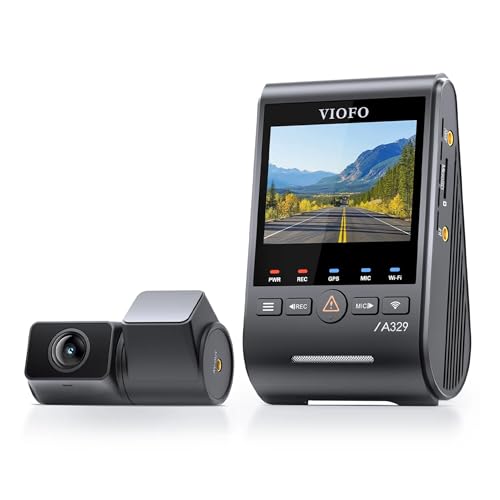
VIOFO A329S: Great Road Footage, Cabin Module Sold Separately
A 4K 60 fps front camera and 2K rear camera with flexible parking modes. This listing is the 2CH kit, so there is no cabin camera in the box.
The VIOFO A329S has several editions. The listing here is the 2CH version, meaning front and rear. VIOFO’s page shows a 3CH edition with a cabin camera and says you can add an interior cabin module to the 2CH later, but that module is not part of this kit. Treat the A329S as a front-and-rear camera with strong parking features: VIOFO lists five parking modes, a supercapacitor instead of a battery, microSD up to 512 GB and an external SSD up to 4 TB with an optional cable. VIOFO also lists an operating range of -4°F to 149°F.
If you want a cabin view and prefer VIOFO, check that the listing you buy includes the cabin camera. Our VIOFO A329S profile explains the editions in more detail.
Recording Passengers: Laws Differ by State
Recording a conversation is regulated differently from state to state. Some states let a conversation be recorded when one party agrees. Others require everyone involved to agree, which is where a cabin microphone can cause trouble. Video and audio are often treated separately, with audio usually stricter. The Reporters Committee for Freedom of the Press publishes a state-by-state summary of recording laws for phone calls and in-person conversations, and it is a reasonable place to start. It is a summary, not legal advice, so confirm the rule for each state you drive in.
Camera makers say the same thing. Garmin’s manuals warn that some jurisdictions may prohibit audio recording in a vehicle or require all passengers to know about it and consent. Thinkware’s guide says voice recording is on by default and lets you switch it off, and it adds a privacy recording option that deletes files after a set time.
Practical steps that fit nearly any state:
- Put a visible notice in the car that video, and audio if enabled, is being recorded.
- Consider turning the microphone off. Video of the cabin is often enough to settle a dispute.
- Read the current Uber or Lyft policy on dash cams and recording before you mount anything. We did not consult either company’s policies for this guide, so we cannot summarize them. Look in the driver help section of each app.
- Keep footage private, back up clips you need and delete the rest.
Rules on where a device may sit on the windshield also vary, so check your state’s rules before choosing a spot.
Which One Should You Pick?
- You want the inside of the car recorded: the Vantrue N4 Pro S is the only kit in this guide that includes a cabin camera.
- You mostly want road and parking footage: the Thinkware U3000 PRO (radar parking) or VIOFO A329S (4K at 60 fps, SSD support) suit that better. Neither records passengers as sold here.
- You want a simple setup and no cabin recording: a front-only camera such as the Garmin Dash Cam X310 is quicker to install.
Compare all eight cameras side by side in our full dash cam comparison.
Power, Cards and Setup Tips
For a work vehicle, power planning matters as much as the camera. Plugging into the 12V socket is the easiest route, and the camera runs only when the car does. Hardwiring lets the camera record while parked but adds an install, and Thinkware warns that connecting to a continuously powered outlet may drain the car’s battery on some vehicles. Look for a kit with a low-voltage cutoff.
Use a high-endurance microSD card sized for your camera: Thinkware’s guide lists 64 GB to 512 GB, Vantrue lists up to 1 TB, and VIOFO lists up to 512 GB. Format the card in the camera, check clips on the app now and then, and keep the lens and windshield clean. Before every shift, glance at the status light to make sure the camera is recording.
Sources
Frequently asked questions
Which dash cam here records inside the car?
Only the Vantrue N4 Pro S kit. According to Vantrue, it includes a 1080p cabin camera with four infrared LEDs for night vision. The Thinkware U3000 PRO and VIOFO A329S listings on this page are front and rear kits.
Can I add a cabin camera to the Thinkware or the VIOFO?
Both brands make one, but check carefully. Thinkware lists an interior IR camera as a separate accessory and says it cannot be used together with its LTE module. VIOFO says the A329S series accepts an interior cabin module. Either way, you would be buying something that is not in the kit linked here.
Is it legal to record passengers?
It depends on your state, and audio is usually treated more strictly than video. Some states require everyone in a conversation to agree to audio recording. Check your state's law and the current Uber or Lyft policy, and consider turning the microphone off.
Should I tell passengers they are being recorded?
A visible notice is a sensible habit, and in some states it matters for consent. Garmin's manuals warn that some jurisdictions require everyone to know about and consent to recording. This is not legal advice, so confirm what applies where you drive.
Do I need parking mode for rideshare?
Not for the trips themselves. Parking mode only helps when the car is parked and the camera has constant power, which means a hardwire or OBD kit. Many drivers skip it and plug into the 12V socket.