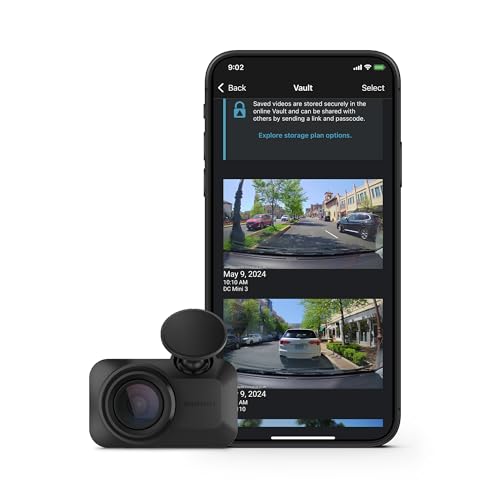
The Garmin Dash Cam Mini 3 is a small, screen-free front dash cam with voice control and an adhesive mount that tucks behind the rear-view mirror. It is the entry-level model in Garmin’s lineup and the discreet pick among the dash cams we compared. For a larger option, see the Garmin Dash Cam X310, and for a bigger two-camera kit see the ROVE R2-4K Dual Pro.
This profile is built from published sources, not from our own use of the camera. We relied on Garmin’s owner’s manual for the Mini 3 and two write-ups from TechRadar and Tom’s Guide, and we credit each source by name. Garmin’s product pages did not open for us, so the manual is our primary source. It does not list the video resolution, so those figures come from the two outlets.
The Short Version
According to TechRadar, the Mini 3 records Full HD (1080p) HDR video at 30 fps through a 140-degree lens that now has a built-in polarizing filter. According to Garmin’s manual, it has voice control, automatic incident detection that saves 15 seconds before and after an event, a Parking Guard mode, Wi-Fi and Bluetooth through the Garmin Drive app, and a Vault cloud option that requires a paid subscription.
It has no screen, no GPS and no power button. It is a camera you mount, plug in and mostly forget about.
Key Specs According to Garmin, TechRadar and Tom’s Guide
- Video: 1080p with HDR at 30 fps, 140-degree field of view (TechRadar, Tom’s Guide).
- Lens: Built-in Clarity polarizing filter, new in the Mini 3 (TechRadar, Tom’s Guide).
- Screen: None (both outlets).
- GPS: None (both outlets).
- Size and weight: About 2.05 x 1.24 x 0.79 inches and 1.05 ounces (30 grams), according to Tom’s Guide.
- Storage: microSDHC or microSDXC, 8 to 512 GB, class 10 or higher, FAT32 (Garmin’s manual). No card in the box (TechRadar).
- Power: USB-C port on the camera, with a vehicle power adapter and a power-only cable in the box. There is no power button: it turns on when it receives power and off when it stops (Garmin’s manual).
- Wireless: 2.4 GHz Wi-Fi and Bluetooth for the Garmin Drive app (Garmin’s manual).
- Operating temperature: -4°F to 140°F (Garmin’s manual).
- Voice control: Default wake word “OK, Garmin”, changeable in the app.
- Multi-camera: Up to four Garmin dash cams can be synced, according to TechRadar.
What Is in the Box
Tom’s Guide describes a minimalist kit: a power cable, a 12V charger and a quick-start guide, with no full manual and no memory card. TechRadar adds that the adapter has two USB-A ports, so you can charge a phone at the same time, and that the cable is USB-C to USB-A. Tom’s Guide also wanted a spare adhesive pad, since the one pad is single-use.
Garmin’s manual tells you to power the camera from the included vehicle power adapter and not from a car USB port, which may not provide enough power for reliable operation.
Video Quality
TechRadar’s writer said the Mini 3 produces sharp, clear footage with nicely balanced exposure and enough detail to read license plates, street signs and road markings, and noticed practically no reflections even on a sunny autumn day. Night footage was less clear, with plates harder to read than in daylight, though vehicles and road markings stayed visible.
Tom’s Guide’s writer called image detail solid for a 1080p camera, praised the contrast from the Clarity HDR, and could make out plates directly ahead even against bright headlights at night. Oncoming plates were harder to read, and the writer said a 60 fps option would have helped. The polarizing filter gave daytime clips a slightly darker, subdued look, which the writer did not find a problem. The same writer was a little disappointed that the resolution did not increase from the Mini 2.
Both outlets treat the Mini 3 as a small step up from the Mini 2, with the polarizing filter as the main change. TechRadar says there is no reason to upgrade if you already own a previous Mini.
The Garmin Drive App, Voice Control and Vault
Garmin’s manual says the Garmin Drive app handles pairing, settings, viewing and exporting videos, and sharing clips. Voice commands let you save a video or turn audio on and off. TechRadar’s writer said the voice system works fairly well, and Tom’s Guide’s writer found the app laid out well with large fonts and buttons, even if the design is not the cleanest.
Remote features are where Garmin asks for money. The manual says remote Wi-Fi features and Vault storage need a paid subscription, which uploads saved videos to the cloud when the camera is on a Wi-Fi network and also allows remote live view. If you do not subscribe, you still get recording, incident detection and clips in the app over the camera’s direct connection.
Parking Guard and Power
Garmin’s manual says that before the camera can record while parked, you must connect it to an always-on 12V cable or to Garmin’s parking mode cable accessory. The Constant Power Cable plugs into the OBD II port, and the manual describes a time switch that sets how long it supplies power after you leave the car: 10 minutes, 24 hours or always on, with low-battery protection that shuts it off to protect the car’s battery. Garmin strongly recommends an experienced installer for the parking mode cable accessory, which connects to constant and switched power and a ground.
TechRadar adds that parked collision alerts need a Wi-Fi connection and a Vault subscription. For some buyers, it says, that adds expense and complexity.
Storage and Card Care
Dash cams write all the time, so cards wear out. Garmin’s manual says to format the card in the camera at least once every six months, to use a high-quality class 10 or better card from a reputable maker, and to consider a larger capacity, since larger cards are overwritten less often. The camera detects card problems and alerts you. Loop recording deletes the oldest unsaved video once the card is full, and a privacy setting can delete unsaved video after three minutes.
Installation
The adhesive mount is meant to stay put, and Garmin’s manual warns that it can be hard to remove. For the best bond, the glass should be clean and between 70°F and 100°F when you stick it on, with 30 seconds of firm pressure. TechRadar’s writer found it blends behind the rear-view mirror, and Tom’s Guide’s writer called the install effortless: tuck the cable into the headliner, plug in the USB-C connector and pair the app. Because the adhesive mount is permanent, this is a poor camera to move from car to car, so plan where it goes. Windshield mounting rules vary by state, so check yours.
Pros and Cons
Pros
- Very small and screen-free, so there is nothing to distract you.
- 1080p HDR video with a built-in polarizing filter.
- Voice control and a clean app.
- Parking Guard and multi-camera sync with other Garmin cameras.
- Easy setup.
Cons
- No GPS and no screen.
- Resolution stays at 1080p, 30 fps.
- Remote features and cloud storage need a paid Vault subscription.
- Parking Guard needs constant power.
- One adhesive pad, and no card in the box.
How It Compares
Against the Vantrue E1 Pro, the Garmin gives up 4K, GPS and a screen in exchange for a smaller body and a cloud service. Against the REDTIGER F7N Touch, it is a single small camera rather than a front-and-rear kit. Against the Garmin Dash Cam X310, it is the smaller, simpler model.
Who Should Buy It
Buy it if you want a dash cam you will not notice. It suits a car with a crowded dash, a driver who dislikes screens, or a driver who already uses the Garmin Drive app. It also suits someone who may add a second Garmin camera later for the rear.
Who Should Skip It
Skip it if you want 4K video, GPS data in the clip, a screen to check the view, or a rear camera in the box. Skip it too if you do not want a subscription for cloud features.
Before You Buy
- Buy a microSD card separately, Class 10 or faster.
- Decide whether you want Parking Guard, and if so, budget for a constant power cable.
- Think about where the adhesive mount will go, since it is meant to stay.
- Check your state’s rules on recording audio and on windshield placement.
You can check the current listing and price at Garmin Dash Cam Mini 3 on Amazon.
See how the Mini 3 compares with the other seven models in our dash cam rankings for 2026.
Sources